The questions people ask before connecting Quo (OpenPhone) to Jobber.
Does Quo integrate with Jobber?+
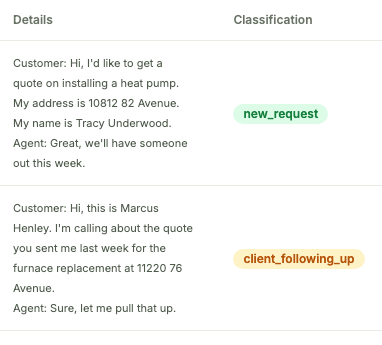
Yes. There's a built-in integration that creates a new client and request for each incoming call. Requestify is an alternative that takes a more measured approach: it classifies each call first, matches it against your existing Jobber clients, and creates a request when there's a new opportunity, with a review-first mode while you build trust in it.
Is there a better Quo + Jobber integration? I tried the built-in one and turned it off.+
Requestify was designed around the feedback we kept hearing from Jobber users: classification before creation (a client following up isn't a new request), matching against your existing clients by phone, email, name, and address, and a review-first mode so you approve each request until you're ready to automate. Call summaries and transcripts sync to the request as notes.
Does this work with OpenPhone?+
Yes. Quo is the new name for OpenPhone: same product, same API. If your team still calls it OpenPhone, Requestify works exactly the same way.
Can Quo calls create Jobber requests automatically?+
Yes. Requestify classifies each incoming call (new request vs. an existing client following up), extracts the client's name, address, and job details from the transcript, and creates the Jobber request. You can stage every request for review first, or let it create them automatically.
Do I need Zapier or a developer to set it up?+
No. Setup is two steps: connect your Jobber account and connect Quo. No Zapier, no code, no developer.
Will it create duplicate clients in Jobber?+
No. Requestify matches incoming callers against your existing Jobber clients by phone, email, name, and address before creating anything. If the client exists, the request lands on their record; if the address is new, it's added as a property on the existing client.
Does Requestify sync my Jobber clients to Quo?+
Yes. Every new client you create in Jobber is added to Quo (OpenPhone) as a contact, deduped on phone and name so you never get double entries. When that client calls, your phone already knows who it is. Run it one-click, or fully automatic.
Can it text clients back?+
Yes. When a new request comes in, Requestify drafts a follow-up text and sends it from your own Quo number. It also nudges the open quotes you've sent that haven't had a reply: review-and-send with one click, or fully automatic. No separate texting tool, no copy-paste.
Can it win back past clients who are overdue for service?+
Yes. Requestify watches your Jobber history and flags past clients who've passed your service interval — matched on the actual invoice line item (like "HVAC maintenance" or "furnace tune-up"). It skips anyone with recent work, then drafts a re-engagement text from your own Quo number. Every text is staged for review until you switch the automation to fully automatic.
Can it handle other Quo + Jobber automations?+
The automations above are what ship today. If there's a workflow you want (a different trigger, a different action), tell us at hi@elmstudios.ai. We build on Jobber for a living, and suggestions shape what we ship next.